Get started for free

 API & AI automations
Use Anchor triggers and actions in Zapier to wire billing events into the thousands of apps your firm already runs, without writing a line of code.
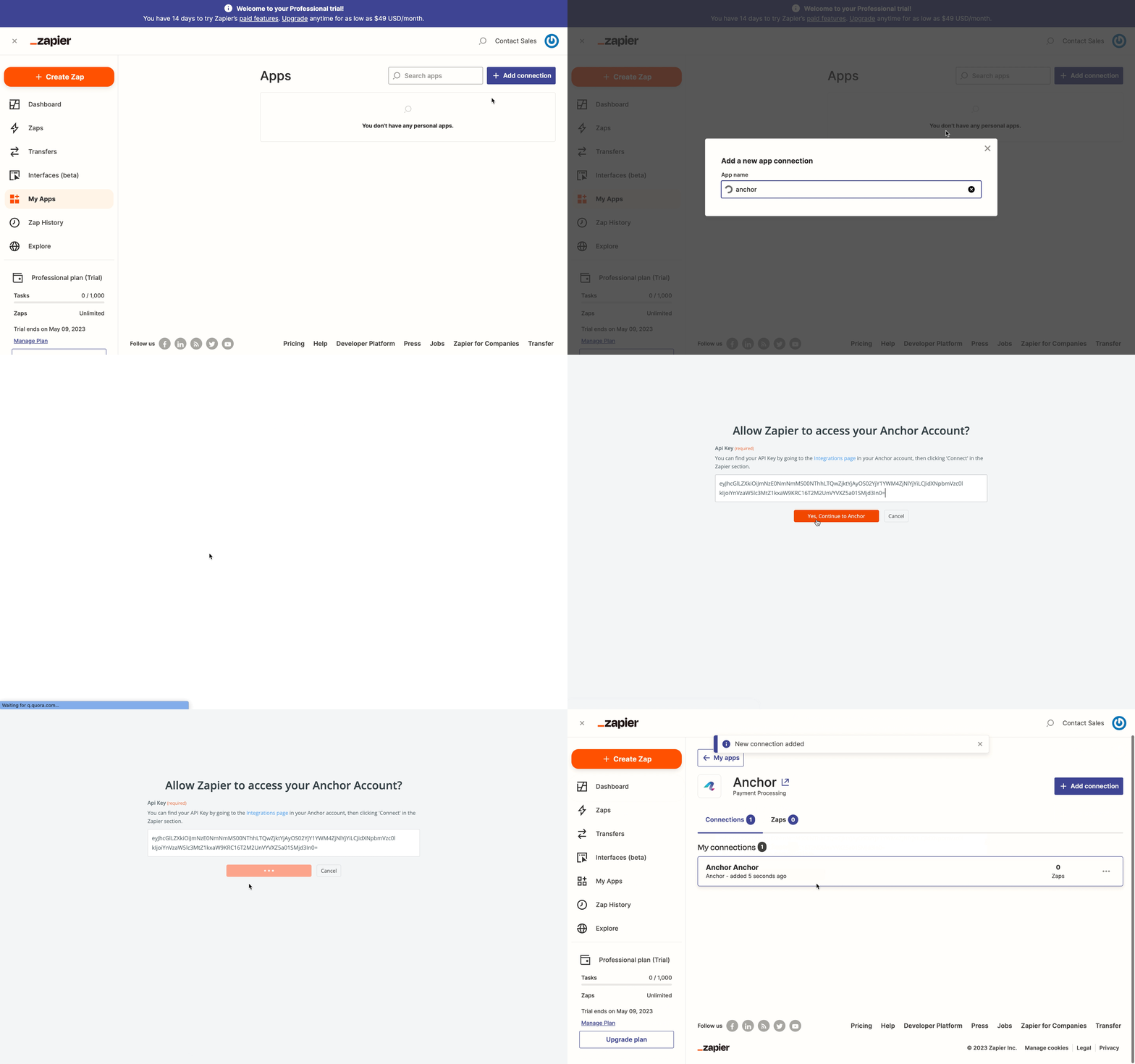
When a proposal is signed or a payment clears, Zapier can move the data anywhere. Build the workflow once and it runs on its own.
The work you already do, with the busywork removed.
Build multi-step automations in Zapier's visual editor with no engineering.
Add filters and paths so each event routes exactly where it should.
Begin from prebuilt Zap templates for common firm workflows.
Connect through Zapier and use a template to get running in minutes.


Anchor + MS Teams
"They connect to just about everything. It just saves so much time across all my companies."
Anchor offers triggers for signed proposals, paid invoices, failed payments, and new client signups, plus actions to create clients and send invoices.
No. Zapier is fully visual. You connect Anchor once and build automations by picking triggers and actions from a menu.
Through Zapier, Anchor connects to more than five thousand apps, so most tools in your stack are within reach.

Build visual billing scenarios across your whole stack.
Real-time two-way sync of invoices, payments, and customers.
Connect Anchor to thousands of apps with one click
Don't see the tool you need? Tell us and we'll look into building it.