


Many accountants and small firms struggle to produce clean, reliable financial reports with generic software that was never built for professional workflows. Disconnected spreadsheets, manual adjustments, and limited visibility often lead to bottlenecks that slow down month-end close and create risk for errors. This is why choosing the right reporting tool is essential for firms that want accurate insights, streamlined processes, and more confidence in their numbers.
In this guide, you’ll find a clear breakdown of today’s top reporting solutions, along with the features that truly matter for accounting teams. You’ll learn how to evaluate tools based on automation, collaboration, and real-time financial clarity so you can choose the platform that supports your firm’s growth. The goal is simple: help you find a reporting tool that delivers the accuracy, transparency, and efficiency your clients expect.
Key Takeaways
- Connect proposals to payments for accurate reporting -Your financial reports are only as good as the data feeding them. A system that automates the entire billing cycle, from client agreement to final payment, gives you a real-time, accurate view of your firm's financial health.
- Prioritize a quick setup and room to grow - Don't get stuck with a tool that takes months to implement. Look for software that you can get running in an afternoon and that will easily scale with your firm, so you aren't forced to switch systems again in a year.
- Focus on return on investment, not just the monthly fee - The cheapest option can cost you the most in lost revenue and wasted time. The right tool is an investment that pays for itself by plugging revenue leaks and automating the manual tasks that hold your team back.
Why Reporting Tools Matter for Accountants & Firms
Strong reporting tools help accountants deliver accurate financial data, maintain compliance, and provide clear transparency for clients. With automated workflows, firms save valuable time on manual reporting tasks while improving forecasting and audit readiness. These tools create a reliable financial picture that supports better decision-making and strengthens client trust.
Without a purpose-built reporting platform, firms often face challenges like inconsistent data, version control issues, and time-consuming reconciliations. These gaps increase the risk of errors and make it harder to close books efficiently or respond quickly to client questions. The right reporting tool eliminates these obstacles by centralizing data, standardizing workflows, and giving firms complete visibility into their financials.
What to Look for in Accounting Reporting Software
Choosing the right reporting software can transform how your firm delivers financial insights, manages clients, and maintains accuracy across every workflow. The best tools combine automation, clarity, and collaboration to help accountants move faster and produce reports they can trust. Below is a breakdown of the essential features to evaluate when selecting a platform that supports your firm’s growth.'
Core Financial Reports
Every reporting tool should generate key financial statements like profit and loss, balance sheets, and cash flow reports. These core outputs form the foundation of client communication and compliance, so accuracy and consistency are essential. Look for software that produces clean, standardized reports without extra manual formatting.
Customizable Reporting and Dashboards
Firms need the ability to tailor views, metrics, and layouts for different clients. Custom dashboards make it easier to highlight trends, KPIs, and insights that matter most to decision-makers. Flexibility ensures your reports feel professional and aligned with each client’s unique needs.
Real-Time Data and Cloud Sync
Real-time syncing eliminates outdated numbers and helps accountants work with the most current financial data. Cloud-based systems also support remote collaboration and ensure information is always accessible. This improves accuracy and speeds up month-end processes.
Integration with Bookkeeping Software
Your reporting tool should work seamlessly with platforms like QuickBooks or Xero. Strong integrations reduce double entry and ensure financial data flows smoothly between systems. This leads to cleaner books and more dependable reports.
Multi-Entity and Multi-Client Support
Accounting firms need tools that can manage several clients or entities within one platform. Centralized views help teams stay organized and avoid mixing data. This is especially valuable for firms managing large client portfolios.
Security and Compliance
Financial data requires high-level protections, including user permissions and encryption. Strong security features help firms stay compliant and protect sensitive client information. This is a non-negotiable feature for any professional-grade tool.
Ease of Use and Support
Your team should be able to learn and navigate the software quickly. Modern reporting tools focus on intuitive design and provide helpful onboarding and responsive support. This reduces downtime and ensures your workflows stay efficient.
Exporting and Client Collaboration
Look for tools that allow easy export to formats like PDF or Excel and support client sharing options. Features like client portals or structured sharing improve communication and streamline review cycles. Collaboration tools help firms deliver insights more efficiently and professionally.
Top Reporting Software and Tools for Accountants
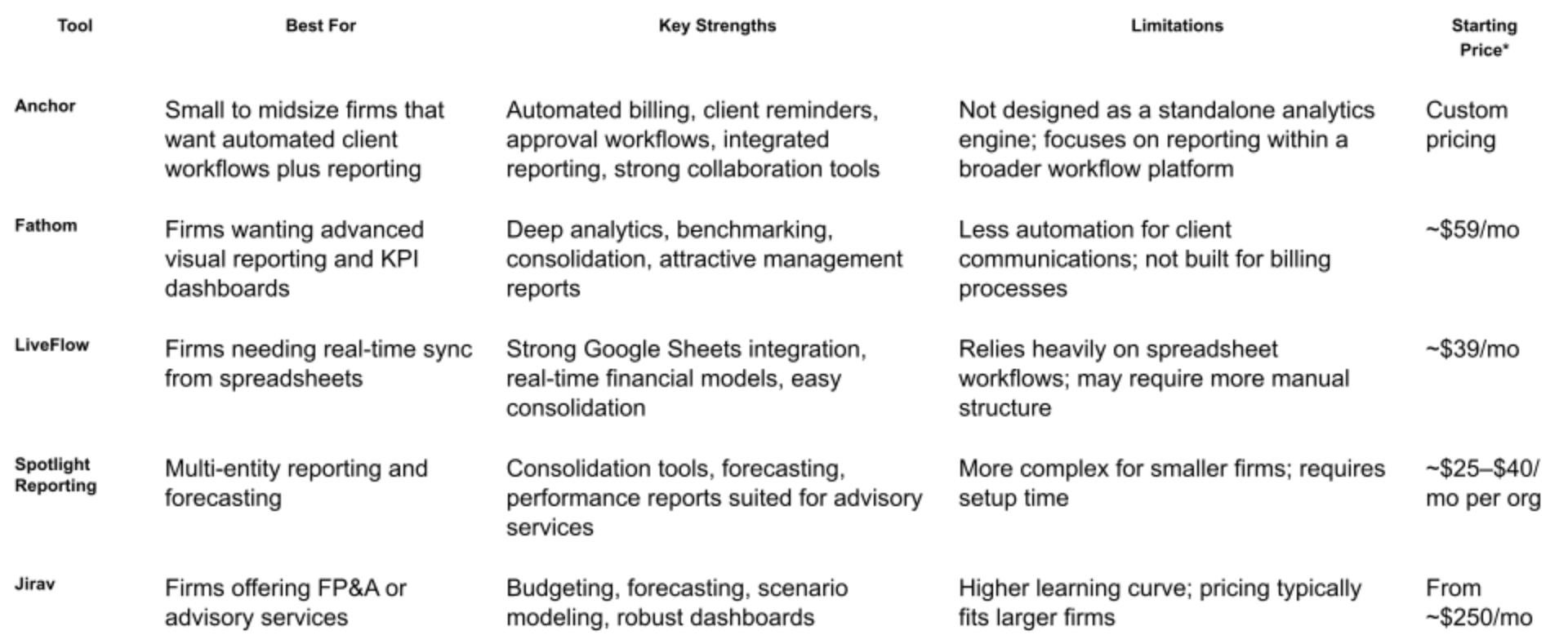
Choosing the right reporting tool depends on your firm’s size, workflow, and client needs. Below is a concise comparison of leading platforms that offer strong financial reporting capabilities. Each tool has unique strengths, and the best choice will depend on whether your priority is automation, deep analytics, or seamless integration with your existing stack.
The table below highlights key features, ideal users, limitations, and starting prices where publicly available. This helps accountants quickly identify which solutions align with their reporting processes, firm size, and client expectations.
How to Choose the Right Tool for Your Practice
Choosing the best reporting software depends on your firm’s structure, reporting depth, and workflow needs. Evaluating the right criteria upfront helps you avoid tools that do not scale or fail to integrate smoothly with your existing systems. Use the guide below to narrow your choices with confidence.
Firm Size and Client Volume
Smaller firms may prefer tools that simplify essential reporting without complex setup, while larger practices often need consolidation, automated workflows, and multi-client management. Consider how many clients you serve and how frequently you generate financial reports, since this directly affects usability and time savings.
What Kind of Reporting You Need
Some firms only require core statements like P&L, balance sheet, and cash flow, while advisory-focused firms need forecasting, KPIs, and scenario modeling. Evaluate whether your priority is clean, standardized reports or deeper analytics that support growth planning.
Budget and Pricing Considerations
Reporting tools range from affordable options for basic needs to premium platforms built for advanced advisory work. The best choice is one that delivers measurable efficiencies without overwhelming your software budget.
Integration Needs With Existing Tools
Smooth integration with bookkeeping platforms like QuickBooks, Xero, and payroll or billing systems is essential for accurate, real-time reporting. A tool that connects easily with your current tech stack reduces manual entry and improves data reliability.
Security and Compliance Requirements
Accountants handle sensitive financial information, so strong data encryption, access controls, and audit trails are non-negotiable. Ensure the software supports compliance standards and provides permission settings tailored to your internal processes.
Why Anchor May Be the Right Choice for Your Firm
Anchor brings together automated billing, workflows, and client communication with built-in reporting tools that streamline your entire practice. Firms that value accuracy, consistency, and reduced manual work benefit from Anchor’s real-time integrations and automated reminders that keep clients on track. If you want a platform that supports scalable operations while improving efficiency across every engagement, Anchor offers a unified solution designed specifically for modern accounting firms.
Frequently Asked Questions
My accounting software already has reporting features. Why do I need another tool?
That’s a great question. While software like QuickBooks or Xero is fantastic for managing your firm's internal books, it doesn't automate the entire financial relationship you have with your clients. Think about the gap between sending a proposal, getting it signed, and then manually creating invoices and chasing payments. Anchor is specifically designed to close that gap, connecting your client agreements directly to automated billing and payments, which gives you much more accurate and reliable revenue reports.
So, does Anchor replace my current accounting software?
Not at all! It’s designed to work as a partner with your existing accounting software. You can think of Anchor as the specialized system that handles your entire client engagement and billing lifecycle, from the first proposal to the final payment. It then feeds all that perfectly reconciled data back into your general ledger, like QuickBooks or Xero, which remains the core system for your firm's overall financial health.
I'm worried about the time and hassle of switching to a new system. How difficult is it to get started?
This is a completely valid concern, as many software implementations can be a huge headache. The good news is that modern, focused platforms are built differently. Because Anchor integrates directly with the practice management and accounting tools you already use, you can get fully set up in a single afternoon. You’re not ripping out your entire tech stack; you’re just adding a powerful automation layer on top of it.
How does paying for a tool like this actually save my firm money?
It’s less about the subscription fee and more about the money you stop losing. Most firms have small revenue leaks from things like unbilled work, scope creep, or simple human error in invoicing. By automating the entire process based on a signed client agreement, Anchor helps reduce that leakage from an industry average of over 5% to less than 1%. When you add in the hours your team saves by not having to create invoices or chase down payments, the return on your investment becomes very clear.
Will my clients be okay with an automated billing system? I don't want our relationship to feel impersonal.
Clients actually love the clarity and ease of this kind of system. They get a professional, easy-to-understand proposal that they can sign from any device, and they only have to connect their payment method once. After that, payments happen automatically based on the terms they’ve already agreed to. This eliminates surprise invoices and removes the need for you to send awkward payment follow-up emails, making the financial part of your relationship smoother and more professional.
Ready to Streamline Your Reporting Workflow?
The right reporting software can transform how your firm operates, from reducing manual work to delivering clearer insights for your clients. Anchor is built to simplify your workflows by unifying billing, reporting, and client communication in one platform. If you are looking for a tool that saves time, improves accuracy, and scales with your practice, Anchor gives you the foundation you need to grow confidently.